15 Best Computer Cameras for YouTube Creators in 2027
If you’re creating YouTube content in 2027, you’ll want a computer camera that captures sharp 1080p or even 4K video with smooth 30fps and clear audio through noise-canceling mics. These features are essential for producing high-quality videos that engage your audience.
The best webcams for YouTube creators also come with privacy shutters and easy plug-and-play setup, making them super convenient.
Wide-angle lenses help with great framing, so you always look your best on screen. Some cameras even include AI tracking and built-in lights to boost your image quality automatically.
Keep exploring to uncover the best options that fit your streaming style and setup needs perfectly. Whether you’re a beginner or a pro, the right computer camera can make all the difference in your YouTube journey.
EMEET C960 1080P Webcam with Microphone, 2 Mics, 90° FOV, Computer Camera
Experience sharp 1080p video quality with the EMEET C960 Webcam, designed to enhance your streaming and recording sessions. Its 90° wide-angle lens captures a broad view, making it ideal for group calls or presentations in well-lit spaces. The fixed focus lens ensures your image stays clear from nearly one to ten feet away.
This webcam solves common audio issues by using dual omnidirectional microphones that deliver clear sound from multiple directions. You’ll need to manually select it as the default mic in your settings, but once set, it keeps your voice crisp and natural.
The EMEET C960 offers hassle-free setup with plug-and-play USB compatibility across Windows, macOS, and Android TV. Its compact design includes a privacy cover to protect your lens when not in use, and automatic light correction helps maintain consistent image quality.
For maintenance, simply keep the lens clean and avoid exposure to low light, as performance depends on proper illumination. This webcam is a practical choice for creators and professionals who want reliable video and audio without complex adjustments.
Best for: Content creators, remote workers, and streamers needing a dependable 1080p webcam with clear audio in well-lit environments.
What We Like:
- Crisp full HD 1080p video with a wide 90° field of view.
- Dual omnidirectional microphones for clear voice capture.
- Easy plug-and-play USB setup on multiple platforms.
- Privacy cover and automatic light correction enhance security and image quality.
Specification:
| Feature | Details |
|---|---|
| Manufacturer | EMEET |
| Video Resolution | 1080p Full HD |
| Field of View (FOV) | 90° |
| Microphones | Dual omnidirectional |
| Connectivity | USB plug-and-play |
| Compatible Systems | Windows, macOS, Android TV |
| Focus Type | Fixed focus |
| Dimensions (inches) | Compact design (exact size not specified) |
| Additional Features | Privacy cover, automatic light correction |
Logitech Brio 101 Full HD 1080p Webcam for Streaming and Meetings – Black
Experience clear, professional video calls with the Logitech Brio 101 Full HD 1080p Webcam. It delivers sharp, bright visuals that make your meetings and streams look polished and vibrant. The webcam’s advanced lighting correction adjusts brightness and reduces shadows, so you stay clearly visible even in less-than-ideal lighting.
Designed for ease of use, this webcam connects quickly via USB-A and works seamlessly with major video platforms. You can easily control zoom and framing through the Logi Options+ app, allowing you to customize your video to fit your needs. Its built-in microphone captures clear audio, eliminating the need for an external mic.
Privacy is a priority with the integrated shutter, giving you peace of mind when the camera is not in use. The compact design fits neatly on your monitor or tripod and requires minimal upkeep — just occasional cleaning to maintain its lens clarity.
Best for: professionals and content creators seeking a reliable webcam with excellent video quality and privacy features for streaming and meetings.
What We Like:
- Clear Full HD 1080p video with enhanced lighting correction.
- Adjustable zoom and framing via Logi Options+ app.
- Built-in microphone and convenient privacy shutter.
- Easy plug-and-play setup with USB-A connection.
- Sleek design that fits various setups with minimal maintenance.
Specification:
| Feature | Details |
|---|---|
| Manufacturer | Logitech |
| Resolution | Full HD 1080p |
| Zoom | 5x optical (via app) |
| Field of View | 60 degrees |
| Connectivity | USB-A |
| Color | Black |
| Dimensions | Compact design |
| Weight | Lightweight |
1080P HD USB Webcam with Microphone and Privacy Cover
- 【1080P HD Clarity with Wide-Angle Lens】Experience exceptional clarity with the Shcngqio TWC29 1080p Full HD Webcam. Its wide-angle lens provides...
- 【Noise-Reducing Built-In Microphone】Our webcam is equipped with an advanced noise-canceling microphone that ensures your voice is transmitted...
- 【Automatic Light Correction Technology】This cutting-edge technology dynamically adjusts video brightness and color to suit any lighting condition,...
- 【Secure Privacy Cover Protection】The included privacy shield allows you to easily slide the cover over the lens when the webcam is not in use,...
- 【Seamless Plug-and-Play Setup】Designed for user convenience, the webcam is compatible with USB 2.0, 3.0, and 3.1 interfaces, plus OTG. It requires...
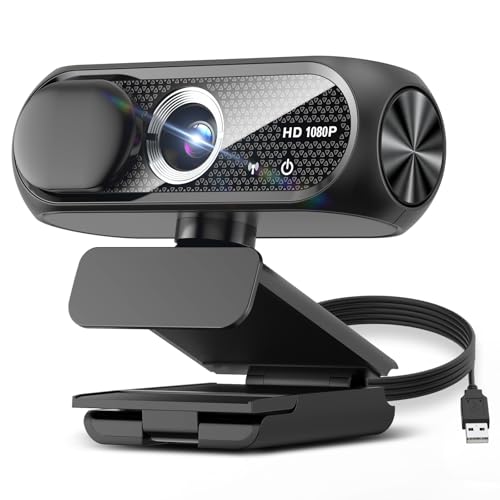
Capture every detail with 1080P Full HD clarity using this USB webcam. Its wide-angle lens ensures you’re always in frame, while automatic light correction keeps your video bright and clear. This solves common issues with dim or uneven lighting during calls or streams.
The built-in noise-reducing microphone provides clear, crisp audio, making communication smoother for virtual meetings or live streaming. You won’t have to worry about background noise interfering with your voice.
Designed with privacy in mind, it features a sliding cover that protects your personal space when the camera is off. The eco-friendly, durable build means it withstands daily use while being kind to the environment.
Setup is simple—just plug it into your device, and it’s ready to go. It works well with most computers and laptops, making it a versatile choice for content creators and professionals alike.
Best for: Content creators, streamers, and professionals seeking sharp video and clear audio with built-in privacy for versatile online use.
What We Like:
- Crisp 1080P HD video with automatic light adjustment
- Noise-reducing microphone for clear audio capture
- Privacy cover for enhanced security
- Eco-friendly and durable construction
- Easy plug-and-play setup with broad compatibility
Specification:
| Feature | Details |
|---|---|
| Manufacturer | Not specified |
| Video Resolution | 1080P Full HD |
| Lens Type | Wide-angle |
| Microphone | Built-in noise-reducing |
| Focus | Fixed (1 to 2 meters) |
| Connectivity | USB |
| Privacy Cover | Sliding lens cover |
| Dimensions | Not specified |
| Weight | Not specified |
| Color Options | Not specified |
NexiGo N60 1080P Webcam with Microphone and Privacy Cover
Experience smooth, clear video calls and streaming with the NexiGo N60 1080P Webcam. Designed to deliver sharp Full HD footage, it transforms your indoor video experience by providing crisp visuals at 30fps with a wide 110-degree field of view. This webcam addresses common issues like poor lighting and shaky images with built-in low-light correction and digital stabilization.
The integrated noise-canceling microphone reduces background sounds, ensuring your voice comes through clearly during meetings or recordings. Its plug-and-play USB setup guarantees hassle-free use across various operating systems, eliminating compatibility worries. Plus, the privacy cover adds a layer of security when the camera is not in use.
Maintenance is simple with the durable glass lens and easy-to-clean privacy cover, making it a practical addition to any workspace. While the fixed-focus lens works best within 19.6 inches to 13 feet indoors, it may not suit outdoor or long-distance use. Note that it’s not compatible with gaming consoles and lacks advanced autofocus or higher frame rates for specialized tasks.
Best for: Professionals, creators, and remote workers needing a reliable, easy-to-use 1080p webcam with clear audio for streaming, video calls, and content creation.
What We Like:
- Sharp 1080p Full HD video with wide 110-degree viewing angle
- Built-in noise-canceling microphone reduces ambient noise
- Plug-and-play USB connection with broad OS compatibility
- Privacy cover enhances security when not in use
Specification:
| Feature | Details |
|---|---|
| Manufacturer | NexiGo |
| Video Resolution | 1080p (1920×1080) at 30fps |
| Lens | 3.6mm glass, fixed focus |
| Field of View | 110 degrees |
| Microphone | Built-in noise-canceling |
| Connectivity | USB plug-and-play |
| Compatible Systems | Windows, macOS, Linux |
| Privacy Cover | Included |
| Optimal Focus Distance | 19.6 inches to 13 feet |
TRAUSI 1080P FHD Webcam with Mic & Privacy Cover
The TRAUSI 1080P FHD Webcam with Mic & Privacy Cover transforms your video calls and streams with crisp, vibrant visuals. Its full HD 1080p resolution combined with a wide-angle lens ensures clear, detailed images at a steady 30 frames per second. This makes it ideal for professional meetings, online classes, or live streaming where image quality matters.
Audio clarity is just as important, and this webcam’s noise-reducing microphone helps keep your voice clear even in busy or noisy environments. You won’t have to worry about background distractions interfering with your communication.
Designed for convenience, the webcam features automatic light correction that adjusts to different lighting conditions. This ensures you look your best regardless of where you set up. The included privacy cover offers peace of mind by physically blocking the lens when the camera is not in use, protecting your privacy effortlessly.
Setup is straightforward with USB plug-and-play compatibility on both PCs and Macs. Its durable, eco-friendly design balances performance with sustainability, making it a reliable and responsible choice.
Best for: Professionals, educators, and content creators who need reliable video quality and clear audio with easy setup and privacy protection.
What We Like:
- Sharp 1080p Full HD video with a wide-angle lens for clear visuals
- Noise-reducing microphone maintains audio clarity in noisy settings
- Automatic light correction adapts to varying environments
- Privacy cover enhances security when the webcam is idle
Specification:
| Feature | Description |
|---|---|
| Manufacturer | TRAUSI |
| Video Resolution | 1080p Full HD |
| Frame Rate | 30 fps |
| Lens | Wide-angle |
| Microphone | Noise-reducing |
| Connectivity | USB |
| Cable Length | 5 feet (1.5 meters) |
| Compatibility | PC and Mac |
| Privacy Cover | Included |
| Design | Eco-friendly, durable |
Logitech C920x HD Pro PC Webcam Full 1080p/30fps Video – Black
Experience clear, professional video quality with the Logitech C920x HD Pro PC Webcam. It delivers reliable full HD 1080p video at 30fps, making your video calls and streams look sharp and vibrant. The webcam’s advanced autofocus and automatic light correction adjust seamlessly, ensuring you stay well-lit even in dim environments.
This webcam improves your online communication by capturing natural sound through its dual microphones. It balances audio clarity, reducing background noise for a smooth conversation or recording. Compatible with Windows 11, Mac, and Nintendo Switch 2, it offers flexibility across multiple devices.
Maintenance is simple with a lightweight design weighing only 5.7 ounces, making it easy to set up or reposition as needed. The included 3-month XSplit VCam license lets you blur or replace backgrounds without a green screen, enhancing privacy and professionalism.
While it’s limited to 30fps at full HD and not suited for wet conditions, the Logitech C920x balances performance and portability for most indoor video needs.
Best for: Professionals and content creators who need dependable full HD video and clear audio for streaming, video calls, and recordings.
What We Like:
- Sharp 1080p video with advanced autofocus and light correction
- Dual microphones capture clear, natural sound
- 3-month XSplit VCam license for background customization
- Compatible with multiple platforms including Windows, Mac, and Nintendo Switch 2
- Lightweight and easy to position
Specification:
| Feature | Details |
|---|---|
| Manufacturer | Logitech |
| Resolution | 1080p (Full HD) |
| Frame Rate | 30fps |
| Weight | 5.7 ounces (0.36 lb) |
| Compatibility | Windows 11, Mac, Nintendo Switch 2 |
| Color | Black |
1080P USB Webcam with Microphone & Privacy Cover
Experience clear, vibrant video quality with the 1080P USB Webcam with Microphone & Privacy Cover. This webcam is designed to enhance your video calls and recordings by delivering crisp Full HD images, even in challenging lighting conditions. Its automatic HDR and light correction features ensure your face remains well-lit and sharp without extra adjustments.
The webcam’s 360° rotating head allows you to easily find the perfect angle, making it simple to frame yourself or your surroundings. Dual noise-canceling microphones capture clear, natural sound by reducing background noise, so your voice comes through clearly in meetings or streaming sessions.
Setting up is hassle-free with plug-and-play USB compatibility across Windows, Mac, Linux, and Android. The built-in privacy cover offers peace of mind by protecting your lens when the webcam is not in use. Compact and lightweight, this device fits neatly into any workspace or home office setup.
Maintenance is straightforward — simply keep the lens clean and the privacy cover closed when not in use to preserve image quality and privacy. While the fixed focus lens limits manual adjustments, the overall ease of use and reliable performance make it a practical choice for everyday video needs.
Best for: Content creators and remote professionals seeking a reliable Full HD webcam with clear audio and built-in privacy protection.
What We Like:
- Sharp 1080P Full HD video with HDR for clear images in varied lighting
- Dual noise-canceling microphones ensure clear, focused audio
- Easy plug-and-play USB setup across multiple operating systems
- Privacy cover secures the lens when not in use for added security
Specification:
| Feature | Details |
|---|---|
| Manufacturer | Not specified |
| Dimensions | Compact size (exact size not provided) |
| Weight | Lightweight (exact weight not provided) |
| Material | Not specified |
| Color Options | Not specified |
| Video Resolution | 1080P Full HD |
| Connectivity | USB 2.0 |
| Rotation | 360° adjustable head |
| Microphones | Dual noise-canceling |
| Compatibility | Windows, Mac, Linux, Android |
EMEET 1080P Webcam with Microphone, C960 Web Camera 2 Mics Streaming Webcam
Experience clear, sharp video and crisp audio with the EMEET 1080P Webcam with Microphone, C960. Designed to improve your streaming and video conferencing, it ensures you look professional even in low-light environments. The Full HD 1080p resolution and 90-degree wide-angle lens capture every detail, making your online presence more engaging.
This webcam features dual omnidirectional microphones that reduce background noise, so your voice comes through clearly. Its compact and foldable design includes a privacy cover to protect your lens when not in use and a universal clip that fits securely on laptops and monitors. Setup is simple with plug-and-play compatibility across multiple operating systems.
Maintaining the webcam is straightforward—its durable build withstands regular use without extra care. However, note that the fixed focus lens means it’s best suited for general video calls rather than close-up shots. Also, for the best audio experience, manually select it as your default microphone in settings.
The EMEET C960 is a practical choice for those needing a reliable, easy-to-use webcam that enhances communication without complicated setup.
Best for: Professionals and content creators seeking dependable, high-quality video and audio for streaming, remote work, and online meetings.
What We Like:
- Sharp Full HD 1080p video with effective low-light correction
- Dual noise-reducing omnidirectional microphones for clear sound
- Compact, foldable design with privacy cover and universal clip
- Easy plug-and-play setup across multiple platforms
Specification:
| Feature | Details |
|---|---|
| Manufacturer | EMEET |
| Resolution | 1080p Full HD |
| Lens | 90-degree wide-angle |
| Microphones | Dual omnidirectional |
| Design | Compact, foldable |
| Compatibility | Windows, macOS, Linux |
| Dimensions | Approx. 3.5 x 2 x 1.5 in |
| Weight | Approx. 0.2 lb |
AOC 4K Webcam for PC, Streaming Computer Camera with Noise-Canceling Mic
Experience crystal-clear video and audio with the AOC 4K Webcam, designed to elevate your streaming and video calls. This webcam captures ultra-high-definition 3840×2160 resolution video, ensuring every detail is sharp and vibrant. The noise-canceling microphone delivers clear sound, cutting through background distractions for professional-quality communication.
The camera automatically adjusts exposure, focus, and white balance, adapting to your environment for consistent image quality. Its wide 80°-90° field of view, along with a 180° tilt and 360° swivel, allows you to frame yourself perfectly without hassle. A physical sliding lens cover offers peace of mind by protecting your privacy when the camera is not in use.
Plug-and-play compatibility with PCs, Macs, and tablets via USB-C or USB-A means no complicated setup is needed. For maintenance, simply wipe the lens cover and microphone area gently to keep the device clean and functioning optimally. The webcam’s 45°C maximum operating temperature suggests usage in well-ventilated spaces to avoid overheating.
Best for: Professionals and content creators needing reliable 4K video and clear audio for streaming, video conferencing, and recording on various devices.
What We Like:
- Sharp 4K Ultra HD video with 8 MP still image capture
- Built-in noise-canceling microphone for clear communication
- Adjustable viewing angles with 180° tilt and 360° swivel
- Physical lens cover for enhanced privacy protection
Specification:
| Feature | Details |
|---|---|
| Manufacturer | AOC |
| Video Resolution | 3840 x 2160 (4K UHD) |
| Still Image | 8 Megapixels |
| Field of View | 80° – 90° |
| Tilt Range | 180° |
| Swivel Range | 360° |
| Connectivity | USB-C / USB-A |
| Operating Temperature | Up to 45°C |
EMEET S600L 4K Webcam for Streaming with Ring Light, 1/2″ Sensor, 0.2S PDAF
Experience crystal-clear video with the EMEET S600L 4K Webcam, designed to elevate your streaming and content creation. Its 0.2-second PDAF autofocus ensures your image stays sharp and clear, whether you’re close to the camera or far away. This fast focusing helps you look professional without constant adjustments.
The webcam’s 1/2″ Samsung sensor captures true 4K resolution at 30FPS and smooth 1080p at 60FPS, delivering vibrant and stable visuals. A built-in ring light offers four color modes and adjustable brightness, so you can easily tailor your lighting for any environment. This eliminates the need for extra lighting equipment while improving your on-camera appearance.
Dual microphones pick up clear sound within a 10-foot range, enhancing your audio quality for calls and streams. The flexible mounting options and 360° rotation let you find the perfect angle quickly, making setup simple and hassle-free.
Maintaining the EMEET S600L is straightforward with its durable design and USB 2.0 connection. While the USB 2.0 may limit maximum data speed, it remains compatible with most devices, ensuring dependable performance.
Best for: Content creators and remote professionals needing fast autofocus and customizable lighting to achieve sharp 4K video.
What We Like:
- Rapid 0.2-second PDAF autofocus for consistent sharpness
- Integrated ring light with multiple color modes and adjustable brightness
- Dual microphones capture clear audio up to 10 feet
- Flexible mounting and 360° rotation for easy framing
Specification:
| Feature | Details |
|---|---|
| Manufacturer | EMEET |
| Sensor Size | 1/2″ Samsung |
| Resolution | 4K @ 30FPS, 1080p @ 60FPS |
| Autofocus Type | PDAF (0.2 seconds) |
| Lighting | Built-in ring light, 4 color modes, adjustable brightness |
| Microphones | Dual, effective up to 10 feet |
| Connectivity | USB 2.0 |
| Rotation | 360° |
| Mounting | Flexible options |
EMEET PIXY Dual-Camera AI-Powered PTZ Camera 4K, AI Tracking
Step up your streaming and presentations with the EMEET PIXY Dual-Camera AI-Powered PTZ Camera 4K. This camera delivers ultra-clear 4K video while effortlessly tracking subjects, ensuring your content stays sharp and engaging. Its AI-driven technology reduces the hassle of manual adjustments, letting you focus on your performance.
The dual-camera design includes a 4K Sony sensor with PDAF focus and an AI auxiliary camera, providing fast and precise autofocus and exposure. You’ll enjoy smooth 310° pan and 180° tilt movements, controlled easily via gestures. This reduces interruptions and keeps your subject perfectly framed.
Audio clarity is enhanced by a triple-mic array with noise-canceling modes, capturing clean sound even in noisy settings. While best suited for indoor use, the camera’s compact build fits seamlessly into any setup. Maintain it by keeping the lens clean and storing it safely when not in use. Note that a tripod is sold separately, and the USB 2.0 connection may limit data transfer speeds compared to newer standards.
Best for: Content creators and professionals needing reliable 4K video with smart AI tracking and clear audio for dynamic indoor streaming or presentations.
What We Like:
- Fast 0.2-second autofocus with AI assistance for flawless video quality
- Smooth AI-powered PTZ control with gesture recognition
- Triple-mic array offering effective noise cancellation
- Compact and versatile design for easy integration
Specification:
| Feature | Details |
|---|---|
| Manufacturer | EMEET |
| Dimensions | Compact size (exact not specified) |
| Weight | Not specified |
| Camera Resolution | 4K with Sony sensor |
| Pan Range | 310° |
| Tilt Range | 180° |
| Connection | USB 2.0 |
| Microphones | Triple-mic array |
| Use Case | Indoor streaming/presentations |
EMEET C950 1080P Webcam, USB Webcam with Microphone&Physical Privacy Cover
Experience crystal-clear video without compromising your privacy with the EMEET C950 1080P Webcam. Designed to enhance your streaming and video calls, it captures sharp 1080p footage at 30FPS using a reliable 2MP sensor and a 70° ultra-angle lens. This webcam ensures your image remains stable and clear, even in low-light conditions, thanks to its fixed-focus lens and built-in low-light correction.
Your privacy is a top priority with the physical privacy cover that prevents unauthorized recordings when not in use. The integrated omnidirectional microphone captures balanced audio while minimizing background noise, making your conversations clearer and more natural. Setup is simple with plug-and-play compatibility across Windows, macOS, and Linux systems.
Maintenance is hassle-free; the durable design and easy-to-clean lens keep your device performing optimally. Its compact size fits neatly on any monitor or laptop, ideal for professionals and creators who demand quality and security in one device.
Best for: Privacy-conscious users needing dependable 1080p video and clear audio for streaming, remote work, or online meetings.
What We Like:
- Physical privacy cover for enhanced security
- Clear 1080p video with low-light correction
- Balanced audio with noise reduction microphone
- Easy plug-and-play across major operating systems
- Compact, durable design for versatile placement
Specification:
| Feature | Description |
|---|---|
| Manufacturer | EMEET |
| Resolution | 1080p (1920×1080) |
| Frame Rate | 30 FPS |
| Sensor | 2 Megapixels |
| Lens | Fixed focus, 70° angle |
| Microphone | Built-in omnidirectional |
| Privacy Cover | Physical shutter |
| Compatibility | Windows, macOS, Linux |
| Dimensions (approx.) | Compact size |
| Weight | Lightweight |
EMEET C60E Dual-Camera 4K Webcam for Streaming, Wide-Angle & Telephoto
Experience professional-grade video quality with the EMEET C60E Dual-Camera 4K Webcam, designed to transform your streaming and video calls. This webcam tackles the challenge of capturing both wide scenes and detailed close-ups without swapping devices. Two 4K sensors work in tandem—one delivers expansive wide-angle views, while the other zooms in with up to 11X hybrid zoom for sharp telephoto shots.
Control is intuitive and seamless. Adjust zoom, brightness, and RGB lighting in real time using the remote or the EMEET STUDIO software. This ensures smooth transitions during live streams or meetings without interrupting your flow. The vibrant RGB accents provide subtle status cues and a modern aesthetic to your setup.
Built for clarity, the dual omnidirectional microphones pick up clear audio within a 9.8-foot range, reducing the need for external mics. Compatible with Windows, macOS, and popular streaming platforms, the webcam fits naturally into diverse workflows. The USB 2.0 Type-A connection keeps things simple, though it may limit data transfer speeds compared to newer standards.
Regular maintenance is straightforward—just keep the lenses clean and software updated for consistent performance. The RGB lighting adds style but might not fit every professional environment, and zoom is unavailable in 4K at 60FPS or certain color modes, which could affect some users’ preferences.
Best for: Content creators, educators, and remote professionals who require flexible wide-angle and close-up 4K video with easy, real-time control.
What We Like:
- Dual 4K cameras enable versatile wide-angle and telephoto shots with smooth zoom.
- Remote and software controls allow uninterrupted adjustments during streams.
- Dual omnidirectional microphones capture clear audio up to 9.8 feet.
Specification:
| Feature | Details |
|---|---|
| Manufacturer | EMEET |
| Resolution | Dual 4K Sensors |
| Zoom | 11X Hybrid Zoom (limited modes) |
| Microphones | Dual omnidirectional |
| Connectivity | USB 2.0 Type-A |
| Compatible OS | Windows, macOS |
| RGB Lighting | Yes |
Pro HD 1080p/30fps Webcam with Tripod, External USB Camera for PC/Laptop
Experience clear, professional video with the Pro HD 1080p/30fps Webcam with Tripod, designed to keep you connected effortlessly. Whether you’re on business calls or creating content, this webcam delivers smooth, detailed video that enhances your presence online.
Its 1080p resolution combined with a wide-angle lens captures sharp images, while auto-focus and low-light correction adjust automatically to keep you looking your best. The built-in dual noise-cancelling microphones pick up your voice clearly from up to 10 feet, cutting out background distractions.
The webcam offers versatile mounting options—you can attach it securely to your monitor or place it on the included adjustable tripod with 360° rotation. When not in use, easily slide the privacy shutter to cover the lens for peace of mind.
Maintenance is simple: the plug-and-play USB connection works across major platforms without extra drivers, and the sturdy design requires minimal upkeep. Note that the fixed 5-foot cable and standard 30fps frame rate may limit some users, and additional lighting might be necessary in dim environments.
Best for: professionals and content creators seeking a reliable webcam that balances quality video, clear audio, and flexible setup for remote work and streaming.
What We Like:
- Sharp 1080p video with auto-focus and wide-angle capture
- Dual noise-cancelling mics for clear sound up to 10 feet
- Flexible mounting with clip-on and adjustable tripod options
- Privacy shutter for easy lens coverage
- Plug-and-play USB compatibility across platforms
Specification:
| Feature | Details |
|---|---|
| Manufacturer | Not specified |
| Resolution | 1080p (1920×1080) |
| Frame Rate | 30fps |
| Lens | Wide-angle |
| Microphones | Dual noise-cancelling |
| Cable Length | 5 feet (1.5 meters) |
| Mounting | Monitor clip & tripod |
| Tripod Rotation | 360 degrees |
| Compatibility | USB, major platforms |
| Privacy Shutter | Yes |
HD 1080P USB Webcam for PC and Laptop
Experience clear and detailed video every time with the HD 1080P USB webcam, designed to enhance your online presence effortlessly. This webcam brings sharp, vibrant visuals that help you communicate more effectively, whether streaming or video calling. Its easy plug-and-play setup means you can start recording or streaming without technical delays.
The webcam’s auto-brightness adjustment improves image quality in low-light environments, keeping your appearance natural and vivid. Lightweight and portable, it easily attaches to most screens with its adjustable clip. This makes it a practical choice for users who need a reliable webcam on the go.
Maintenance is simple—just keep the lens clean with a soft cloth to ensure clear images. No complex drivers or software updates are required, reducing hassle and keeping your workflow smooth. Its compatibility with USB 2.0 and 3.0 ports ensures broad support across many devices.
While it lacks advanced features like autofocus or zoom, it provides consistent, lag-free video and good audio syncing for everyday use. This webcam is ideal for those who want straightforward, high-quality video capture without extra complexity.
Best for: content creators, remote workers, and students who need reliable, high-definition video for streaming, online classes, and video calls.
What We Like:
- Crisp 1080P HD video with natural color and clear detail
- Plug-and-play USB connection with no drivers needed
- Adjustable clip fits most monitors and laptops
- Auto-adjusting brightness for improved low-light performance
- Lightweight and portable for easy use anywhere
Specification:
| Feature | Details |
|---|---|
| Manufacturer | Not specified |
| Resolution | 1920 x 1080 pixels (HD) |
| Connectivity | USB 2.0 / USB 3.0 |
| Weight | Lightweight (exact weight not specified) |
| Compatibility | PC and Laptop |
| Mount Type | Adjustable clip |
| Cable Length | Long braided cable |
| Microphone | Built-in (basic quality) |
Factors to Consider When Choosing a Computer Camera for YouTube
When picking a computer camera for YouTube, you’ll want to focus on video resolution and audio quality to make your content stand out. Don’t forget to take into account lighting, exposure, and how well the camera connects with your device.
Also, think about privacy features to keep your recordings secure. These little details can really make a difference in your videos and your peace of mind.
Video Resolution Importance
Choosing a computer camera with at least 1080p resolution can dramatically boost the quality of your YouTube videos. Higher resolutions like 1080p or 4K deliver clearer, more detailed images that keep your viewers engaged and convey professionalism.
When your content is viewed on larger screens or zoomed in, a higher resolution guarantees sharpness and visual appeal. While 4K offers superior quality, it demands more bandwidth and processing power, so you should balance resolution with your system capabilities.
Also, remember that resolution alone isn’t enough—good lighting and overall camera quality play vital roles in producing crisp images. By prioritizing a camera with strong resolution, you’ll meet YouTube’s standards and provide your audience with an enjoyable, high-quality viewing experience.
Audio Quality Features
Although video quality captures your viewers’ attention, audio quality keeps them engaged, so you’ll want a computer camera with built-in microphones that deliver clear, noise-free sound.
Look for models featuring noise reduction technology to minimize background distractions. This ensures your voice stands out crisply.
Dual omnidirectional microphones are ideal, as they capture sound evenly from all directions. This maintains consistency no matter your movement.
Pay attention to microphone sensitivity and frequency response, typically between 100Hz and 10KHz. These specs help get accurate voice reproduction in various environments.
Compatibility with multiple audio formats like AAC, MP3, and PCM is important for smooth editing and streaming.
Finally, a privacy cover for the microphone or camera adds an extra layer of security when you’re not recording. It protects your privacy effortlessly.
Lighting and Exposure
Along with crisp audio, lighting plays a big role in how your video looks. Proper lighting enhances your camera’s exposure, making sure your face is well-lit and shadows don’t obscure details.
You’ll want a webcam with automatic light correction to adjust exposure in real-time as lighting changes during your shoot. Low-light correction technology also helps by boosting visibility in dim environments without needing extra gear.
Be careful to avoid overexposure, which can wash out important details. Controlling light intensity and using diffusers keeps exposure balanced.
Consistent, diffuse lighting—like from ring lights or softboxes—provides even illumination, minimizing fluctuations and improving your video’s overall quality. Prioritizing these features ensures your content looks professional and engaging every time.
Compatibility and Connectivity
When selecting a computer camera for YouTube, you’ll want to make certain it’s fully compatible with your device’s operating system, whether that’s Windows, macOS, Linux, or even Android. Check that the webcam supports your system to avoid frustrating setup issues.
Next, ensure the camera connects via the right port—USB-A or USB-C—matching your computer’s available slots. Opt for a plug-and-play model so you can start recording immediately without installing extra drivers.
Also, verify the camera’s video resolution and frame rate meet your streaming goals; 1080p at 30fps is a solid baseline. Don’t forget to consider the microphone quality if you rely on the camera’s audio for your videos.
Prioritizing compatibility and connectivity helps you maintain smooth, high-quality YouTube content creation. It really makes a difference in avoiding tech headaches down the road!
Privacy and Security
Since your computer camera often stays connected and ready, prioritizing privacy and security is essential to protect yourself from unauthorized access and potential spying. Look for webcams with physical privacy shutters or covers that block the lens when you’re not using them. These provide reliable protection without extra accessories.
Also, consider cameras with built-in features like automatic lens covers or indicator lights that alert you when the camera is active, helping prevent accidental or malicious recording. Don’t forget to check for software controls allowing you to restrict camera access to trusted apps only.
Finally, choose webcams supporting hardware-level security features to enhance protection against hacking and unauthorized surveillance, giving you peace of mind every time you go live or record content. It’s all about keeping things safe and sound while you’re online.
Frequently Asked Questions
How Do I Set up My Webcam for Optimal Youtube Video Quality?
You’ll want to position your webcam at eye level and guarantee good lighting from the front. Using natural light or a ring light can really make a difference!
Also, keep your background clean and uncluttered to keep the focus on you. Don’t forget to adjust your camera settings to 1080p or higher for the best video quality.
Lastly, test your audio to make sure it matches your video quality perfectly. Clear sound is just as important as clear visuals!
What Lighting Tips Improve Webcam Video Recordings?
Think of your lighting as a sunrise: place soft, diffused light in front to brighten your face evenly.
Avoid harsh shadows by using multiple light sources or a ring light, and keep background lighting subtle for depth.
This way, your video looks natural and well-lit without any distracting shadows.
It’s like setting the perfect mood for your recording!
Can I Use a Computer Camera for Live Streaming on Youtube?
Yes, you can use a computer camera for live streaming on YouTube. Just make sure your camera has good resolution and frame rate.
Pair it with proper lighting and a stable internet connection for the best results. That way, your stream will look clear and run smoothly.
How Do I Troubleshoot Common Webcam Connectivity Issues?
Think of your webcam as a bridge—if it falters, check your USB connection. Restart your computer, update drivers, and guarantee your streaming software has camera access.
These steps will rebuild your bridge and keep your stream flowing. Just take it one step at a time, and you’ll be back on camera in no time!
Are External Microphones Better Than Built-In Webcam Mics for Youtube?
Yes, external microphones are better than built-in webcam mics for YouTube. They capture clearer, richer audio and reduce background noise.
Plus, they give you more control over sound quality. This helps your videos sound professional and engaging.
Conclusion
Choosing the perfect computer camera for your YouTube channel can feel overwhelming, yet simplicity often resides in the details. While high-end models like the EMEET C60E offer stunning 4K quality, budget-friendly options like the NexiGo N60 still deliver solid performance.
You don’t have to sacrifice quality for affordability or vice versa. Ultimately, balancing features with your unique needs ensures your content shines, no matter which camera you pick. Whether you’re after crisp visuals or smooth streaming, the best computer cameras for YouTube creators in 2027 have something for everyone.
So, take your time exploring options that match your style and budget. The right camera will help elevate your videos and grow your audience without breaking the bank. Remember, great content starts with great gear, and the perfect computer camera is just a choice away.